

Instead of re-entering booking details at the airport, check in through your operating airline’s website or app, confirm your travel documents and save the boarding pass it issues. After booking an India flight with Mann Travel AU, use the airline booking reference on your itinerary—not an agency payment or invoice reference—to retrieve your flight.
In-short:
- For ‘check in online india flight booking’, start with your operating airline and airline booking reference.
- Mann Travel AU is best for Australia-to-India travellers seeking agency help with flight bookings.
- Online check-in does not replace passport checks, baggage drop or airport arrival instructions.
- For connecting flights, confirm which boarding passes were issued and where your bags will be checked through.
Why this matters
A confirmed booking, completed check-in and boarding pass are different things. Your itinerary records the journey you booked; check-in confirms your intention to travel; a boarding pass provides the flight-specific document used during departure formalities.
For your 2026 departure, follow the operating airline’s current instructions rather than a timing rule copied from another carrier. Online check-in opening times, closing times and document-verification requirements vary by airline, departure airport and itinerary.
Check-in is complete only when the airline confirms it—not when you finish entering your details. Read the final screen and any confirmation email, especially if the airline directs you to an airport desk.
Before you start
- Have your booking details ready. Keep your airline booking reference, ticket confirmation, passenger surname and departure details together. If your itinerary lists several references, identify the one associated with the airline operating your first flight.
- Gather travel documents and access. Have each traveller’s passport, applicable Indian entry documents and transit documents ready, plus access to the email address or phone used for the booking. Use the airline’s official website or app.
- Check the operating carrier before opening check-in. A codeshare flight can carry one airline’s flight number while another airline operates the aircraft. Follow the itinerary’s check-in instructions; an agency reference or another carrier’s reference can fail in the operating airline’s system.
You do not need to guess a missing reference. If the confirmation is unclear, ask the booking agency to identify the correct airline reference before trying repeated combinations.
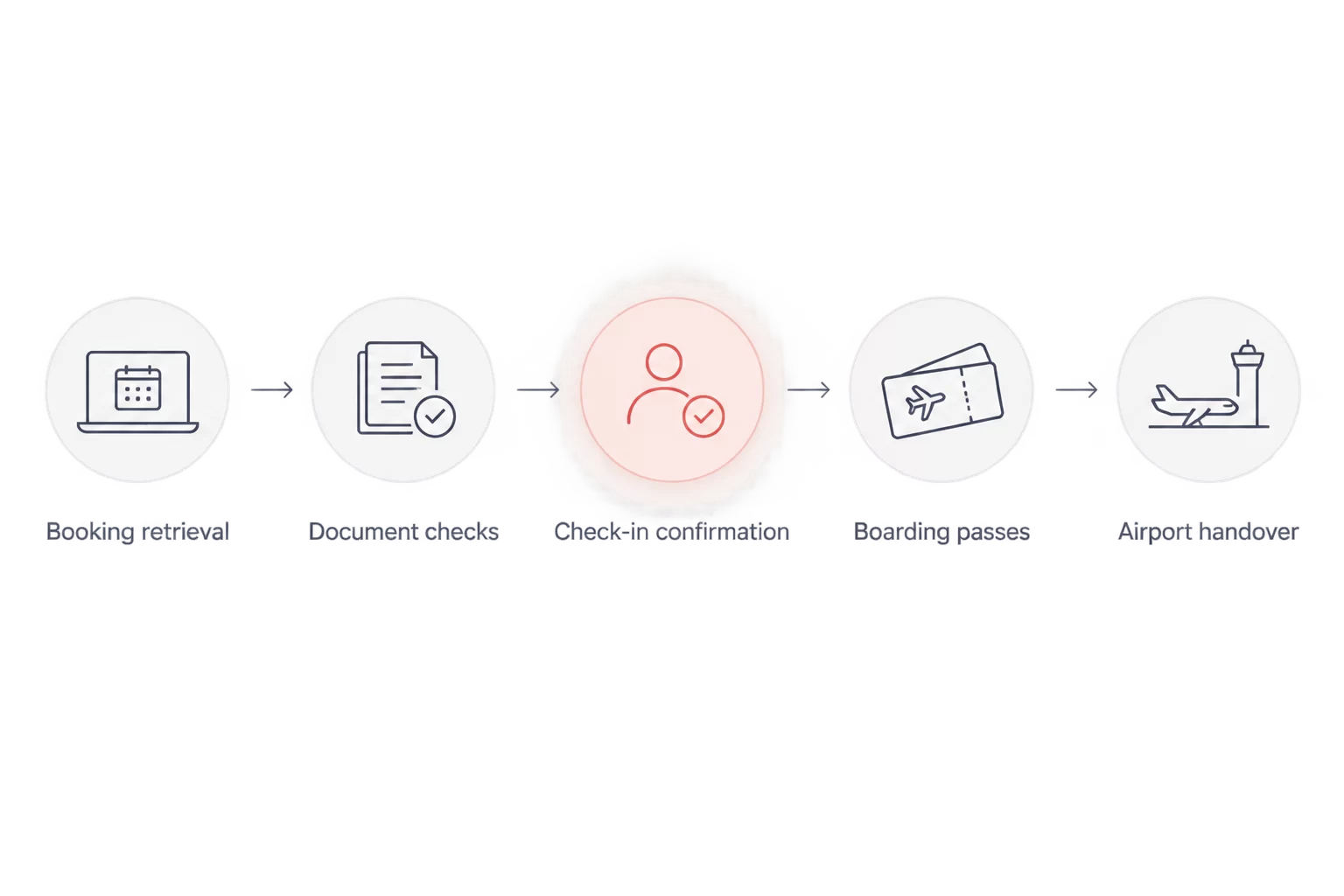
Booking retrieval
Identify the flight and retrieve your reservation
- Open your latest itinerary. Compare the departure date, departure airport and flight number with your travel plans. Use the newest confirmation if your flight has changed.
- Find the operating airline. Look for wording identifying who operates the flight. For a connection, note the operator of each flight rather than assuming the entire trip uses one carrier.
- Open the airline’s official check-in service. Use the check-in link or section on its website or app. Labels differ between airlines; choose check-in rather than a new-flight search.
- Enter the requested identifier and surname. Supply the airline booking reference or ticket number accepted by that service, then enter the surname as recorded in the booking. Do not substitute your agency invoice number.
- Confirm the retrieved journey. Check the traveller names, travel date, departure airport and destination before continuing.
Expected result: the airline displays the correct reservation and either lets you proceed or explains when check-in opens. A booking that appears in the reservation-management area is not automatically checked in.
For a 2026 flight departing around midnight, check the calendar date carefully. A flight shortly after midnight belongs to the new date, even though you travel to the airport the previous evening.
Passenger and document checks
Confirm who is travelling and their document details
- Select the passengers checking in. Review every selected name. If the booking contains a group, do not assume one completed passenger record covers everyone.
- Enter passport information exactly. Where requested, copy the passport number, issuing country, nationality and expiry date from the document the traveller will use. Check letters and digits carefully.
- Provide requested entry information. Complete any visa, residency or destination-address fields the airline presents. Use the traveller’s actual documents; never choose a different category simply to pass a validation screen.
- Review contact details. Check that the email address and mobile number can receive travel messages. Include the correct country code where requested.
- Read the declarations before accepting. Answer security, baggage and dangerous-goods questions accurately for each traveller covered by the declaration.
Expected result: each selected passenger’s details are accepted, or the airline identifies a document check that must happen at the airport. Online acceptance does not replace entry permission or border checks.
Use 3 document checks before continuing: the passport holder’s identity, the passport details entered and the entry document belonging to that traveller. This is a checking method, not a substitute for checking the destination’s requirements.
Seats and check-in confirmation
Review the flight details and complete check-in
- Review the seat information shown. Confirm whether a seat has been assigned and whether travelling companions are together. Read any conditions before accepting a seat change.
- Review baggage information. Check the allowance attached to your ticket and the rules relevant to each operating carrier. Completing check-in does not change the allowance you booked.
- Review assistance arrangements. If your journey involves mobility assistance or another support requirement, confirm the arrangements through the airline or booking agency. Do not treat a check-in comment field as confirmation of a service request.
- Submit the final confirmation. Use the airline’s final check-in control and wait for the result. Do not close the page while it is processing.
- Read the outcome. Look for explicit confirmation, an issued boarding pass or instructions to collect the pass after an airport document check.
Expected result: you know whether check-in succeeded, which passengers it covers and whether the airline issued boarding passes. Record any airport action shown on the confirmation screen.
A seat number alone is not proof of completed check-in. Keep following the process until you receive the airline’s outcome.
Boarding-pass and airport preparation
Save your documents and plan the airport handover
- Save each issued boarding pass. Use the airline-supported download, app or wallet method. Confirm that the saved version opens and its barcode is visible.
- Check which sectors are covered. Match every issued pass to a flight on your itinerary. A pass for the first flight does not prove you have a pass for the connection.
- Keep a backup. Where the airline accepts a downloaded boarding pass, keep 2 accessible copies: the airline-supported version and a separate saved copy. Follow any airport-specific instruction requiring a printed pass.
- Record the relevant deadlines. Check airport arrival guidance, baggage-drop closure and boarding requirements separately. Do not calculate airport arrival from the boarding time alone.
- Set 1 departure reminder. Include the airport, terminal, flight date and any instruction to visit a document-check desk.
Expected result: you can access the required boarding passes without searching through booking emails, and you know whether your first airport stop is a check-in desk, baggage drop or departure processing.
For your 2026 airport trip, recheck the terminal and flight status before leaving. Keep your passport and entry documents accessible even when a mobile boarding pass has been issued.
Connecting flights and your return journey
The same check-in process applies to a connecting itinerary, but you must verify the outcome for each flight. For example, a journey from Melbourne to Amritsar through an intermediate airport needs a check of the onward sector, not just the first departure.
- One connected booking: check which boarding passes the airline issues. At baggage drop, ask staff to confirm the destination printed on the baggage tag and any collection or recheck instructions.
- Separate bookings: retrieve each booking independently. Do not assume the first airline will issue the next boarding pass, transfer baggage or manage a missed onward flight.
- Return journey: repeat check-in when the return flight becomes eligible. Completing outbound check-in does not check you in for the flight back to Australia.
For a connection, verify the boarding pass and baggage instructions separately. Having one does not establish the other.
For your return departure in 2026, use the local departure date and time shown for the Indian airport. Keep the return booking details available independently of the outbound boarding pass.
Online check-in or airport check-in?
Online check-in is best for travellers who can retrieve their booking and complete the airline’s document process. Airport check-in is best for travellers directed to an agent or needing an issue resolved in person.
| Method | Best for | Main benefit | Limitation |
|---|---|---|---|
| Online check-in | Travellers whose booking and documents the airline accepts online | Lets you submit details and obtain eligible boarding passes before departure | Does not remove baggage-drop, document-check or airport deadlines |
| Airport check-in | Travellers instructed to see an agent or unable to complete check-in online | Allows staff to examine documents and resolve check-in issues in person | Requires you to complete those formalities at the airport before the relevant deadline |
Mann Travel AU’s flight-booking service suits travellers who want agency help with an Australia-to-India itinerary. The limitation is operational: the airline controls check-in acceptance and boarding-pass issuance, so agency booking assistance does not replace airline clearance.
Troubleshooting
The airline cannot find your booking
Check the operating airline, booking reference and surname first. Remove accidental spaces when copying the reference, and distinguish the airline reference from the agency invoice number. If the booking still does not appear, ask your booking agency to verify the reference and ticket status.
Check-in has not opened or has already closed
Read the airline’s message and confirm the departure airport’s local date and time. Set a reminder for the opening time displayed. If online check-in has closed, follow the airline’s airport instructions immediately; do not assume airport check-in remains open.
Passport or visa details are rejected
Compare every entry against the original document, including expiry date and issuing country. If the information is correct but rejected, stop changing answers to force acceptance. Follow the airline’s document-verification instructions and take the original documents to the airport.
You receive confirmation but no boarding pass
Read the confirmation for an airport document-check requirement or collection instruction. A confirmation email is not automatically a boarding pass. Check-in can require an airport visit before the airline releases the pass.
Only some travellers or flights appear
Compare the displayed passengers and sectors with the latest itinerary. Separate bookings, different operating carriers and unresolved passenger details need individual attention. Confirm the missing part with the airline or agency rather than treating the entire journey as completed.
Customise your departure checklist
Create a separate checklist entry for every traveller, then group the entries by flight. This prevents a completed adult check-in from hiding an unfinished child’s record or a missing onward boarding pass.
Keep document checks, baggage arrangements and seat preferences separate. They solve different problems, and completing one does not confirm the others.
If a Mann Travel AU booking reference or itinerary needs clarification, use the contact page with your booking details ready. Share passport information only through an appropriate channel requested by the agency or airline.
For family travel, assign one person to check the passenger list, but have each adult verify their own passport details. This preserves a single overview without relying on one person to recognise every document error.
Frequently Asked Questions
How do I check in online after booking an India flight through an agency?
Use the operating airline’s official website or app with the airline booking reference and passenger surname. An agency invoice or payment reference is not a substitute for the identifier the airline requests.
When can I check in online for my India flight?
Check in during the window specified by your operating airline for your departure. Opening and closing times depend on the airline and journey, so follow the current instructions attached to your flight.
Do I need a visa before checking in online for India?
You need the entry documents applicable to your nationality and travel status. If the airline requests visa details during check-in, enter the details from your valid document rather than selecting an unrelated category.
Why have I checked in but not received a boarding pass?
The airline can require an airport document check before issuing your boarding pass. Read the confirmation instructions and allow time to visit the specified desk before its deadline.
Can I go straight to security after online check-in?
Not automatically: checked baggage, document verification and international departure procedures can require other stops first. Follow the airline’s instructions for your airport and keep your passport accessible.
Does online check-in cover my connecting flight to India?
Only treat a connecting sector as checked in when the airline confirms it. Check which boarding passes were issued and confirm baggage-transfer arrangements separately.
Can Mann Travel AU complete airline check-in for me?
Check with the agency about assistance for your specific booking. The operating airline controls check-in requirements, document acceptance and boarding-pass issuance.
One last thing
An offline boarding pass is useful only if you can open it. Before leaving for your 2026 flight, disconnect briefly from the internet and open the saved document using the method your airline supports. Check the passenger name and flight, then reconnect for travel updates.
Related guides
- Seat selection tips for long-haul flights to India
- Airlines for baggage allowance on India flights
- Airlines for families flying to India

