
Instead of manually repeating Melbourne-to-India flight searches, set up Google Flights price tracking so fare-change emails bring you back to your saved search. This guide shows you how to choose your route, enable alerts and check whether a notification matches the trip you actually need.
In-short:
- To set up fare alerts Melbourne India flights, use Google Flights with your destination, dates and passenger details selected.
- Track fixed dates for committed travel; use Any dates when your departure timing is flexible.
- Mann Travel AU suits Australia-to-India travellers who want booking assistance rather than search notifications alone.
- A fare alert is a prompt to check an itinerary, not a reservation or a guaranteed booking amount.
Why this matters
A notification only helps when it tracks a journey you would book. An attractive result loses its value if it uses the wrong airport, excludes the baggage you need or arrives after your family event.
Mann Travel AU is best for Australia-to-India travellers who want agency booking assistance. Use Google Flights for tracking, then approach Mann Travel AU when you want help booking your international journey. The agency and the alert perform different jobs; neither replaces checking the flight details.
For a 2026 trip, write down your non-negotiables before enabling notifications. Your destination, arrival deadline and passenger details matter more than collecting alerts for every possible route.
Before you start
- Account and email access: Sign in to a Google Account and make sure you can receive email at its associated address. Google Flights uses that account to manage tracked searches.
- A usable trip brief: Have your Melbourne departure airport, Indian destination, travel dates, passenger mix and cabin ready. For example, enter 2 adults and 1 child if that is your actual travelling party.
- The gotcha: an alert does not hold a fare. A notification describes a search result, not a ticket reserved for you. Recheck the itinerary and booking conditions when you open it; do not treat the email as confirmation.
You do not need to book a flight to start tracking. Keep passport information out of your search notes; basic route and passenger information is enough for this setup.
Your route and passenger settings
Start with the airport you intend to use, not simply the broadest city search. Melbourne Airport uses MEL; make sure the selected departure matches your plans rather than assuming every Melbourne result uses the same airport.
- Open Google Flights and sign in to the Google Account you want to receive notifications.
- Set the trip type to Round trip or One way, matching your intended booking.
- Set the departure to Melbourne Airport, checking the MEL airport code.
- Enter your Indian destination. Useful airport-code checks include Delhi DEL, Mumbai BOM, Amritsar ATQ and Hyderabad HYD.
- Open the passenger selector and enter the actual adults, children and infants travelling. Select your intended cabin, then choose Search.
Expected result: The results match your departure airport, destination, trip type, passenger mix and cabin. Check these settings before comparing individual flights.
Keep separate Indian destinations in separate searches. Delhi and Amritsar are not interchangeable just because either gets you into India: your onward journey still needs to work.
For a family booking, do not assume a search for a single adult represents the whole party. Search for everyone travelling together so the results reflect that passenger combination.
Your dates and itinerary filters
A useful alert starts with travel dates you can accept. For a wedding, appointment or return-to-work deadline in 2026, work backwards from when you must arrive, not just when you want to leave Melbourne.
- Open the departure-date field and select your outbound date. For a return journey, select the return date as well, then choose Done.
- Review the search results before adding filters. Confirm the displayed dates and airports again.
- Use Stops to narrow the search if you will only consider particular connection patterns.
- Use Bags where offered to compare results against your baggage needs. Still inspect the selected fare's baggage conditions before booking.
- Review journey duration, connection airports and arrival dates. Leave enough flexibility to see alternatives you would genuinely accept.
Expected result: You have a search that represents a practical journey, rather than a broad collection of flights you would reject later.
Best for fixed commitments: Exact-date tracking keeps attention on the trip you need. Its limitation is equally clear: a better result on another date does not solve your problem unless you can change your plans.
Filters narrow the results you see, but do not assume every detail becomes a guaranteed condition of every future email. On returning from an alert, check the displayed search and the selected itinerary again.
Your price-tracking switch
Google Flights uses Track prices for price notifications. This is the control to enable after you have checked the search, rather than a separate booking or payment step.
- Find Track prices on the flight-results page.
- Turn on tracking for your selected dates. Complete the Google sign-in prompt if you are not already signed in.
- Open the Google Flights menu and select Tracked flight prices.
- Find the saved route and verify its airports and dates. If you saved the wrong search, remove it and create the correct one.
- Check the notification settings associated with that tracked search and confirm that email updates are enabled.
Expected result: Your Melbourne-to-India search appears in Tracked flight prices, with notifications enabled for the intended Google Account.
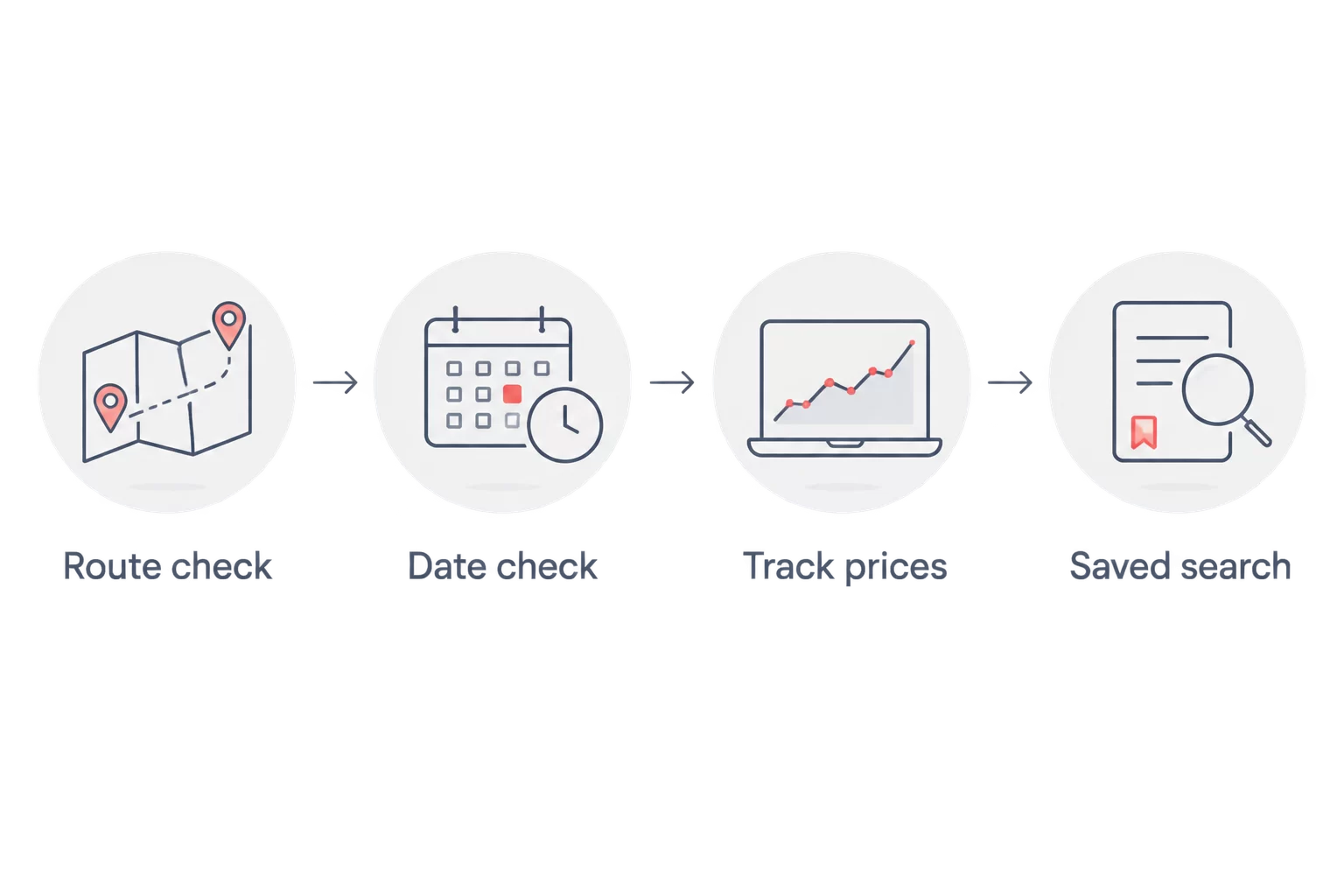
Use this sequence for each genuinely different journey: Route check, Date check, Track prices, Saved search. Keeping those checks in order prevents an incorrect search from becoming a persistent source of irrelevant emails.
Do not wait for an immediate email as proof that setup worked. The saved search and its notification setting are your setup checks; email arrives in response to the service's notification rules, not every time you revisit the page.
Your alert-to-booking checklist
Decide how you will assess an alert before the first notification arrives. That stops a headline result from distracting you from baggage, connections or the date you reach India.
- Open the notification and confirm the route, dates and passenger details.
- Reopen the flight details and check the operating airlines, connection airports and total journey duration.
- Check whether the itinerary involves separate tickets, a self-transfer or an airport change. Read the associated transfer requirements before proceeding.
- Review checked baggage, cabin baggage, change conditions and cancellation conditions for the specific fare.
- Continue to the booking stage only after confirming the current itinerary and final booking total.
Expected result: You can explain exactly what you are booking, including its restrictions, rather than relying on the email summary.
For a 2026 family visit, keep a short note of your acceptable arrival dates and connection limits beside the alert. Give yourself a 10-minute review window to run through this checklist, rather than making a rushed decision from the subject line.
If you want booking assistance, contact Mann Travel AU with your route, dates, passenger mix and the itinerary you are considering. Ask for the baggage and fare conditions with the booking details. A search notification alone does not establish those conditions.
Track flexible dates instead of one departure
Google Flights also offers Any dates tracking for routes where your timing is flexible. For a flexible 2026 visit, this provides a different view from monitoring only a committed departure and return.
Run your route search, find Track prices, then enable Any dates. Afterwards, return to Tracked flight prices and confirm you can distinguish the flexible search from any fixed-date searches you have saved.
Best for flexible visits: Any-date tracking helps you notice opportunities outside your original dates. Its drawback is that a notification can point to travel dates that do not fit your leave, family plans or preferred trip length.
| Workflow | Best for | Main benefit | Main limitation |
|---|---|---|---|
| Google Flights fixed-date tracking | Weddings, appointments and fixed leave | Monitors the dates you selected | Does not replace checking nearby dates separately |
| Google Flights Any dates tracking | Flexible family visits | Broadens monitoring beyond one date pair | Suggested timing still needs checking against your plans |
| Mann Travel AU booking assistance | Travellers wanting help arranging Australia-to-India flights | Adds agency assistance to the booking process | Does not replace your Google Flights notification settings |
Keep fixed-date and flexible-date searches separate. A flexible notification is useful only if you can actually move the journey; otherwise it adds noise without helping you book.
Troubleshooting fare alerts
You cannot find Track prices
Complete a flight search and look on the results page, rather than the initial search form. Sign in to your Google Account. On a smaller screen, inspect the controls around the results and date selection before starting again.
Your saved search uses the wrong dates or airport
Open Tracked flight prices and inspect the saved route. Remove the incorrect entry, return to the search results and recreate it with the intended airport and dates. Changing an unrelated search does not correct the saved entry you already created.
You are not receiving emails
Confirm that the search is saved under the Google Account whose inbox you are checking, then inspect its notification setting. Search your spam and filtered folders. No email by itself does not prove the tracker is broken; verify the saved search before deleting it.
The email result differs when you open it
Recheck the live itinerary rather than relying on the email summary. Flight offers change between a notification and your next search. If the highlighted result no longer appears, compare current results against your original requirements instead of choosing a different journey just to act on the alert.
The alert looks useful but the itinerary is unsuitable
Check the airports, travel dates, baggage and connection details. Tighten your search where appropriate, or replace an overly broad flexible-date alert with a fixed-date search. Keep only the alerts that can produce a journey you would take.
Customise your workflow
Once the basic tracker works, expand it around real choices. If Melbourne-to-Mumbai and Melbourne-to-Hyderabad both fit your plans, create distinct searches and account for the onward journey from each destination.
For school-holiday travel in 2026, set up separate searches for date combinations your household can accept. Do not confuse a flexible departure date with a flexible return date; work commitments can make one adjustable and the other fixed.
Use a simple naming convention in your own notes: route, dates, passenger mix and must-have conditions. Keep those notes alongside any booking correspondence so everyone involved is comparing the same trip.
Review saved searches when your plans change. Remove completed or abandoned trips so a useful notification does not get buried among routes you no longer need.
Frequently Asked Questions
How do I set up fare alerts for Melbourne to India flights?
Search your route and dates in Google Flights, sign in to your Google Account and enable Track prices. Open Tracked flight prices afterwards to confirm that the correct search is saved and notifications are enabled.
Can I track Melbourne to India flights without choosing fixed dates?
Yes, Google Flights offers Any dates tracking for flexible route searches. Check each notification against your acceptable departure dates, return dates and trip length before acting.
Do I need to book a flight before setting up an alert?
No, you can enable Google Flights price tracking without booking a ticket. Saving a search does not reserve a seat or create a booking.
Does a fare alert include checked baggage?
A fare alert is not confirmation of your checked-baggage entitlement. Open the selected itinerary and check the baggage conditions of the specific fare before booking.
Why is the flight different when I open the notification?
The live flight result can change after an alert is generated. Recheck the current itinerary, passenger details and booking conditions rather than relying on the email summary.
Should I track Delhi and Amritsar in the same search?
Separate searches make Delhi and Amritsar alerts easier to assess. Compare each route with the onward travel you actually need, rather than treating the destinations as interchangeable.
Can a travel agency help after I receive a flight alert?
Yes, Mann Travel AU books Australia-to-India flights and offers agency booking assistance. Share the itinerary, dates and passenger details, then confirm the specific baggage and fare conditions before booking.
One last thing
Set an arrival deadline, not just a departure date. A Melbourne departure that looks right in your calendar can still reach India too late for the event that prompted the trip. Check the local arrival date on every itinerary you consider.
Related guides
- Best airlines for Melbourne to Amritsar flights
- Best airlines for Melbourne to Mumbai flights
- Baggage allowance on India flights

